
Genjutsu AI Video Generator
Upload any clip. Keep the motion and camera exactly as filmed — swap the character, the outfit, or the whole scene. No roto, no tracking, no reshoot.
Recast who is in the shot — motion, camera and timing stay locked.
Reference images (required) — One image per new character, left to right.
Genjutsu AI Examples
Same motion, same camera, new reality. Tap Original to see the source clip.
Restyle
A night walk through Tokyo, redrawn as anime. Every step, sign and camera move stays where it was.
 Reference
Motion Transfer
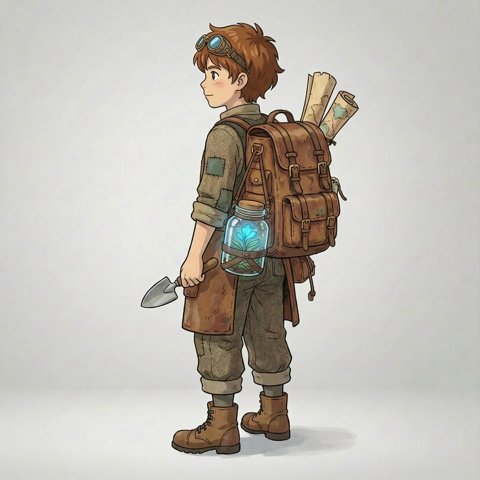
Same walk, new world: the performer becomes an illustrated explorer from one reference image, and the park becomes an island.
Object Swap
Only the outfit changes: a painter's apron becomes a royal gown and crown, while the studio and her expression stay put.
Sample clips from public video-to-video model demos. Your results depend on the mode and the clip you upload.
What Is Genjutsu AI?
Genjutsu AI is a video-to-video generator. Instead of inventing a shot from a text prompt, it starts from a clip you already filmed and keeps everything that made the take work — the movement, the camera path, the timing and the cuts.
Then it rewrites what is in the frame. Put a new character into the performance, replace a product or a prop, move the scene somewhere else, or repaint the whole clip in a new style. It runs in your browser: no install, no rotoscoping, no green screen.
How to Use Genjutsu AI in 3 Steps
- 1
Upload your clip
Drop in the video whose motion you want to keep — a phone clip is enough. Its length sets the length of the result.
- 2
Add your character or object
Pick a mode, add reference images of the character, product or outfit, and describe what should change and what must stay.
- 3
Generate and download
See the credit cost before you start. Renders take a few minutes; failed jobs are refunded automatically.
Genjutsu AI Motion Transfer
Keep the performance, change the performer. Motion Transfer maps every gesture, head turn and camera move from your clip onto the characters in your reference images — mascots, illustrated characters, 3D avatars or a different outfit on the same person.
- Same timing and cuts as the original take
- One reference image per character, left to right
- 768p or 1080p output, 5–30 second clips
Genjutsu AI Object Swap
Change one thing and leave the rest alone. Object Swap replaces a product in a tracking shot, a cup on the table, a jacket, a car or the whole background — guided by your prompt and optional reference images.
- Product and prop replacement without a reshoot
- Point at references in the prompt with @Image1, @Image2
- Original audio kept, 3–15 second clips
Genjutsu AI Restyle
Repaint the whole clip in a new look while the motion stays exactly as filmed. Start from a preset — anime, 3D cartoon, claymation, watercolor, cyberpunk, film noir, pixel art or oil painting — and fine-tune it with your own prompt.
- 8 style presets plus a custom prompt
- The cheapest mode — ideal for your free credits
- Clips up to 30 seconds
Genjutsu AI Free — What You Get
Every new account gets free credits — enough to restyle a short clip and see real results before you pay anything. No card, no subscription. After that, buy a one-time credit pack only when you need more.
Try Genjutsu AI freeGenjutsu AI vs Higgsfield
Higgsfield created Genjutsu as part of its subscription creative suite. Genjutsu AI is an independent alternative focused on one job — video-to-video — with pay-per-clip pricing.
| Genjutsu AI (this site) | Higgsfield Genjutsu | |
|---|---|---|
| How you pay | Pay-per-clip credits, no subscription required | Subscription plans |
| Free to try | Free credits for new accounts | Depends on plan |
| Motion transfer and object swap | Yes | Yes |
| Style presets | 8 presets plus custom prompt | Yes |
| Failed renders | Credits refunded automatically | See their terms |
Comparison as of October 2026; Higgsfield features and prices may change. Higgsfield and Genjutsu are trademarks of their owner. This site is not affiliated with Higgsfield AI.
Genjutsu AI FAQ
What is Genjutsu AI?+
Genjutsu AI is an online video-to-video generator. You upload a real clip and choose what to rewrite — the characters, an object or scene, or the whole visual style — while the original motion, camera movement and timing are preserved.
Is this the official Higgsfield Genjutsu?+
No. Genjutsu AI is an independent alternative built on its own model pipeline and is not affiliated with Higgsfield. You do not need a Higgsfield account or subscription.
Can I use Genjutsu AI for free?+
Yes. New accounts get free credits — enough for a short Restyle — so you can test the results before buying a credit pack. No card is required.
What is the difference between Motion Transfer, Object Swap and Restyle?+
Motion Transfer puts new characters into your clip's performance. Object Swap replaces a specific product, prop, outfit or background. Restyle repaints the entire clip in a new visual style.
How long can my video be?+
Motion Transfer takes 5–30 second clips, Object Swap 3–15 seconds and Restyle up to 30 seconds. Upload MP4 or MOV files up to 100MB.
How are credits calculated?+
Each job costs credits based on the mode, resolution and clip length, rounded up to the next second. You always see the exact cost before you press Generate, and failed jobs are refunded automatically.
Can I use real people as references?+
Only if you have the right to use their likeness. Uploading someone without their consent, public figures or minors is not allowed. Illustrated, cartoon and 3D characters work great.
Can I use the videos commercially?+
Yes, as long as you own or have rights to the footage and references you upload and your use follows our Terms of Service.